

Golf Simulator Accuracy vs Real Life: What Transfers to the Course?

A shot that flies perfectly indoors can still surprise you on the course. That doesn’t make the numbers useless. Golf simulator accuracy vs real life depends on what the system measures and what the simulation can’t recreate.
If you’ve wondered whether indoor distances match your outdoor shots, you’re not alone. A simulator can provide useful feedback on impact and ball launch, helping you spot patterns in your swing. But simulated flight is calculated, and real turf, wind, uneven lies and the ball itself can all affect the result.
This guide explains which simulator measurements can help, why outdoor outcomes may differ, and how to use indoor practice to make better decisions on the course. You’ll learn where screen golf is useful, where it has limits, and how to connect focused practice with the feel and adaptability real golf demands.
Table of Contents
Golf Simulator Accuracy vs Real Life: What Does Accuracy Really Mean?
How Golf Simulators Track Shots and What Can Affect the Numbers
Simulator Results vs Real Golf: Which Shots and Conditions Differ Most?
How to Use a Golf Simulator for Practice That Transfers Outdoors
Make Simulator Feedback More Useful with Guided Golf Practice
Golf Simulator Accuracy vs Real Life: What Does Accuracy Really Mean?
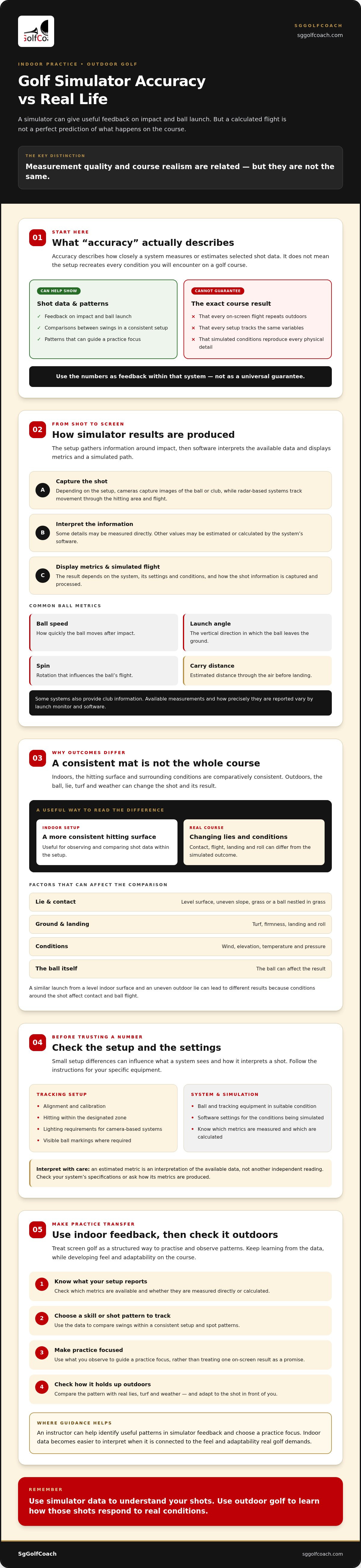
Indoor and outdoor shots can feel different, even when the screen shows a convincing flight and a precise-looking distance. That doesn’t automatically mean the simulator is wrong. Accuracy describes how closely a system measures or estimates shot data. It doesn’t mean the setup recreates every condition you’ll encounter on a golf course.
A golf simulator can accurately report or estimate selected shot data while still producing an outdoor result that differs, because real-course lies, turf and weather affect the ball after impact. This distinction helps explain golf simulator accuracy vs real life: measurement quality and course realism are related, but they aren’t the same.
What does a golf simulator measure?
Depending on the launch monitor and setup, a simulator may capture ball information such as speed, direction, launch angle or spin. Some systems also measure or estimate club details. The available metrics and how precisely they’re reported vary, so don’t assume every setup tracks the same variables in the same way.
The numbers displayed also depend on the system’s settings and software. Some values may be measured directly, while others are calculated from the data collected. To understand the range of golf simulator technology, consider how different systems gather information and turn it into a simulated ball flight. For your own practice, check which metrics your setup provides and treat them as feedback within that system, not as a universal guarantee.
Why simulator accuracy is not the same as course realism
Indoors, the hitting surface and surrounding conditions are comparatively consistent. On the course, a ball may sit on firm turf, nestle into grass or lie on a slope. Wind can shift its flight, while the ground affects how it lands and rolls. A simulated course can represent selected features and conditions, but it can’t reproduce every physical detail of a real shot.
This is why a displayed distance can help you compare one swing with another without matching the outcome outdoors. For example, a similar launch from a level indoor surface and an uneven outdoor lie can lead to different results because the conditions around the shot affect contact and ball flight.
Use screen golf as a structured way to practise and observe patterns, not as a promise that each on-screen outcome will repeat on the course. You can learn from the data while still making room to develop feel and adaptability outdoors.
How Golf Simulators Track Shots and What Can Affect the Numbers
A simulator’s result begins with information gathered around impact. Depending on the setup, cameras may capture images of the ball or club, while radar-based systems track movement through the hitting area and flight. Software then uses the available information to display shot metrics and calculate the ball’s simulated path. Each stage matters: data must be captured, interpreted and processed under suitable conditions.
Simulator results depend on the system being used and on its conditions and settings being correctly configured. Keep this in mind when interpreting golf simulator accuracy vs real life. A number can help you compare swings within a consistent setup, but first you need to know what it represents.
Launch monitor data: ball flight and club information
Common ball metrics include ball speed, how quickly the ball moves after impact; launch angle, the vertical direction in which it leaves the ground; and spin, the rotation that influences its flight. Carry distance is the estimated distance the ball travels through the air before landing. Some systems also provide club information, but the available measurements depend on the launch monitor and software.
Not every figure is necessarily captured directly. A system may measure some details and use software to estimate or calculate others. If a metric is estimated, it’s an interpretation of the available data, not another independent reading. Check the system’s specifications or ask which metrics are measured and which are calculated before using a number to assess a swing change.
Setup and settings that can change simulator results
Small setup differences can influence what the system sees. Alignment and calibration affect how it interprets shot direction, and hitting outside the designated zone may affect tracking. Camera-based systems can have specific lighting requirements, while some systems may rely on visible ball markings. Follow the setup instructions rather than assuming every system works the same way.
Check that the hitting area, ball and tracking equipment are in suitable condition, then review the software settings. Elevation, wind, temperature and ground firmness can shape the simulated flight or landing outcome. A setting left from an earlier session may not reflect the conditions you intend to practise. Where possible, change one variable at a time so you can identify what influenced the result.
The PGA of America’s use of simulators illustrates their role in structured golf training, though it doesn’t make every setup identical or guarantee outdoor results. If you’d like help making sense of your readings, screen golf and golf coaching can offer a practical starting point for purposeful practice.
Simulator Results vs Real Golf: Which Shots and Conditions Differ Most?
A simulator shot and an outdoor shot can produce different distances or trajectories without either result automatically being wrong. The indoor reading reflects the system’s measurements and selected settings. The outdoor outcome also depends on the lie, strike, weather and ground where the ball lands. Comparing those influences is more useful than treating one total-distance number as a verdict on golf simulator accuracy vs real life.
Why carry distance and total distance may not match
Carry is the distance the ball travels through the air; total distance includes the roll after landing. A simulator may estimate roll from its model of the landing area, while a real shot lands on turf that could be firm, soft, sloped or uneven. Landing angle and weather can also affect how far the ball runs.
For a fair comparison, match like with like. Compare carry with carry, and check that course and environmental settings are comparable before assessing total distance. A difference in roll doesn’t necessarily indicate a problem with the shot data.
Why lies, wind and pressure change real-course shots
On a course, a ball sitting in rough or on a slope can change your stance, swing path and quality of contact. A mat cannot recreate every interaction between club and grass, while wind can move a shot away from its expected line. Elevation and atmospheric pressure may also differ from the simulated conditions.
Use indoor results as a reference, not an exact outdoor forecast. Avoid applying a universal distance adjustment: the effect depends on the shot and conditions. Notice what differs, then use outdoor play to build feel for lies, turf and weather.
How to Use a Golf Simulator for Practice That Transfers Outdoors
Indoor practice is most valuable when each session has a purpose beyond producing a satisfying number. Choose one skill, create a repeatable baseline, then look for patterns you can test on the course. This makes golf simulator accuracy vs real life a practical question: does the practice help you make a more reliable swing or decision, even when outdoor conditions change?
A simple routine for reliable indoor practice
Set one clear objective. Warm up, then choose a focus such as improving strike consistency, controlling start direction or rehearsing a shot shape. Keep the goal narrow enough to assess.
Establish a baseline. Use the same ball, hitting position and simulator settings where possible. Record a small set of relevant metrics, such as carry distance for distance control or start direction for a target-line exercise. Use only measurements your setup provides.
Practise with intention. Work on the chosen skill rather than chasing one unusually long or straight shot. Notice recurring tendencies across your attempts. A pattern is more useful than a single standout result.
Review and adjust. Note what changed when you made a swing adjustment and whether the intended pattern became more consistent. Avoid changing several things at once so you can tell which adjustment may have helped.
Retest the baseline. Return to the same shot and conditions later in the session or in a future practice. Comparing like-for-like results helps you judge progress without treating every variation as meaningful.
For ideas on making indoor sessions purposeful, explore this guide to indoor golf practice and play.
Check whether simulator progress transfers to the course
When you next play outdoors, choose one skill from your practice session to test. If you’ve worked on starting the ball toward a target, pay attention to your aim and shot pattern. Note the lie and weather, too. A shot from rough into a breeze isn’t a like-for-like test of one hit from a flat indoor surface.
Assess more than distance. Did you make the intended decision? Was contact reasonably consistent? Did the ball tend to start in the expected direction? These observations show whether a skill is becoming usable, even if the final result differs from the screen. Adjust your expectations to the conditions rather than applying a fixed distance correction.
Beginners building a strong foundation can explore beginner golf lessons and core skills. For a practice focus tailored to your swing, consider working with a golf coach to interpret feedback and connect indoor work with course decisions.
Make Simulator Feedback More Useful with Guided Golf Practice
Simulator data can help you notice patterns, but it can’t tell the whole story of your swing or guarantee how a shot will finish on a course. Use the feedback to ask better questions: Is the ball starting where I intend? Is my contact becoming more consistent? Which change is worth practising? Guidance can turn golf simulator accuracy vs real life from a debate about numbers into a plan for improvement.
When coaching can help interpret simulator feedback
An instructor can connect repeated shot patterns with technique and a manageable practice focus. For example, a cluster of shots starting to one side may be more useful than an isolated distance reading, especially when considered alongside what you felt during the swing. The aim isn’t to react to every variation, but to decide which patterns are meaningful and what to work on next.
Before a lesson, bring a clear question and any observations you’ve recorded. Note the shot you were practising, the pattern you saw and whether a swing change seemed to affect it. This gives the conversation a practical starting point. For guidance on choosing instruction that suits your needs, read about professional golf coaching guidance.
Choose the practice environment that fits your next step
Independent screen-golf practice can suit golfers who have a defined skill to rehearse or want an indoor option for practice and play. A lesson may help if you’re unsure which feedback to trust, finding it difficult to build a repeatable swing or looking for a structured focus. You can also combine the two: use coaching to clarify what to practise, then return to the simulator to work on that skill.
Each setting has a role. Screen golf offers a consistent indoor environment, but it can’t reproduce every outdoor lie, turf interaction or weather condition. Course play remains essential for learning how to adapt. Guided practice can help bridge the gap by connecting a clear technical focus with better decisions and more deliberate preparation.
SgGolfCoach offers professional instruction, including adult lessons and bespoke coaching, alongside indoor screen-golf experiences. The simulator is a tool for practice, not a promise of course results. An instructor can help you interpret its feedback and choose a suitable next step. If you’d like to explore your options, explore golf coaching and screen-golf options.
Turn Better Practice into More Confident Play
The key to golf simulator accuracy vs real life is knowing what the numbers can tell you. Simulator readings can help you spot patterns and practise with purpose, but outdoor lies, turf and weather shape the shot too. Focus on repeatable skills, compare relevant measurements, then test your decisions and shot patterns on the course.
Professional instruction can help golfers at different levels make sense of simulator feedback and choose a suitable practice focus. SgGolfCoach offers adult lessons, bespoke coaching and indoor screen-golf experiences, with lessons available to book online. Use screen golf as an indoor option for practice or play, while building adaptability through real-course experience.
Explore SgGolfCoach’s golf lessons and indoor screen-golf options to choose a clear goal for your next practice session.
Frequently Asked Questions
How accurate are golf simulators?
Golf simulators can provide useful, repeatable shot information, but accuracy varies by system and setup. A launch monitor may capture some ball or club measurements directly while software calculates or estimates others. Check the system’s documented capabilities, setup instructions and settings before relying on a particular metric. Use readings as a consistent practice reference, not a guarantee that every shot will produce the same result outdoors.
Why do I hit the ball different distances on a simulator and a real course?
Indoor and outdoor shots happen under different conditions, so their distances may not match. The simulator’s settings and the way it displays carry or total distance affect what you compare. Outdoors, wind, elevation, slope, lie, turf firmness and contact quality can change the result. Compare carry with carry, or total distance with total distance, and look for patterns across shots rather than expecting each one to travel identically.
Can a golf simulator improve my real-life game?
Yes, purposeful simulator practice can help you work on a repeatable skill, review shot patterns and practise with a clear objective. Transfer isn’t automatic: course play adds varied lies, weather and decisions that an indoor session may not recreate. Choose a focus, such as contact consistency, then test it outdoors when possible. If you’re unsure what the feedback means, coaching can help turn observations into a practical practice plan.
Do golf simulators measure club data or only ball flight?
It depends on the launch monitor and simulator setup. Some systems provide selected club information alongside ball-flight data; others display a different set of metrics or calculate some values using software. Check the system’s documented capabilities to understand what each figure represents. Don’t assume readings from different setups were captured or calculated in the same way, even if they share the same metric name.
Why is simulator carry distance different from total distance?
Carry distance is how far the ball travels through the air; total distance includes its roll after landing. Roll depends on conditions such as turf firmness, slope and landing angle, while a simulator uses its settings or assumptions to represent the landing. For a clearer comparison, compare carry with carry first. Treat total distance as more dependent on the conditions after the ball comes down.
Should beginners practise on a golf simulator or outdoors?
Both can support a beginner’s development in different ways. A simulator offers a controlled place to practise a specific skill and review available feedback. Outdoor play introduces real lies, weather and visual course conditions. Choose the setting that suits your current goal, then gradually test skills in varied situations. An instructor can help you set a manageable focus and understand which feedback is useful.
What should I check before trusting golf simulator numbers?
Check that the system is set up according to its instructions, and ask which metrics it measures directly versus calculates or estimates. Review settings such as wind or elevation before comparing sessions, and keep the ball and hitting position consistent where possible. Look for a pattern across several shots rather than judging one result. If readings seem unexpected, ask the facility or an instructor about the setup.


Comments